Nickolas Patino

JavaScript • HTML • CSS • Browser Game

Goblin Slayer Game

A browser-based JavaScript game prototype where the player moves across the bottom of the screen to stop falling goblins.

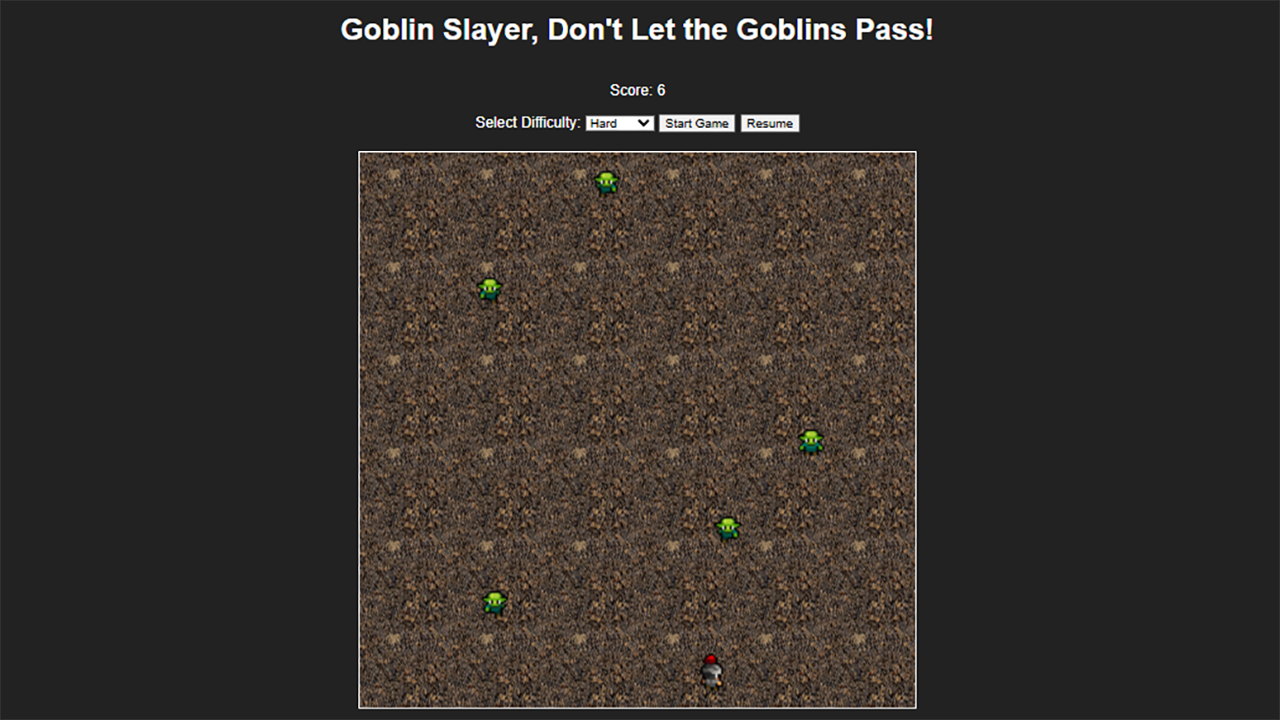
Goblin Slayer browser game screenshot

Overview

Goblin Slayer Game is a compact browser game built with standard web files instead of a dedicated game engine. The demo includes a score display, difficulty selector, start button, pause button, animated player sprite, animated enemy sprites, and a scrolling dirt background.

Game Objective

Goblins fall from the top of the play area. The player moves left or right to intercept them before they pass through.

Difficulty Settings

Easy, medium, and hard modes adjust enemy speed and the maximum number of active enemies.

Score Tracking

The score increases when an enemy reaches the player collision area and is reset back into play.

Gameplay Features

The prototype focuses on the core pieces needed for a playable browser action game.

Player Movement

The player can move left and right using keyboard input, mouse input, or touch input.

Enemy Spawning

Enemy sprites spawn from the top of the play area at timed intervals until the active enemy limit is reached.

Sprite Animation

Player and enemy animation frames are pulled from sprite sheets using JavaScript-controlled background positioning.

Collision Scoring

Enemy position is checked against the player position. Successful contact increases the score and resets the enemy.

Pause and Resume

The pause button stops enemy spawning, movement, animation, and background scrolling until the game resumes.

Scrolling Background

The tiled dirt background scrolls during play to create a sense of motion.

Technical Implementation

The project uses a simple static page structure with separate CSS and JavaScript files. The game area is a square responsive container, with the player and enemies positioned absolutely inside it.

HTML

The page defines the game container, score display, difficulty selector, start and pause controls, game area, and player element.

CSS

CSS handles the page layout, responsive game area, tiled dirt background, and sprite sheet sizing for the player and enemy elements.

JavaScript

JavaScript manages game state, input handling, difficulty settings, enemy spawning, sprite animation, collision checks, score updates, pause behavior, and background scrolling.

Project Scope

This is a playable prototype rather than a full production game. The scope is focused on browser-based movement, simple enemy behavior, sprite animation, difficulty settings, and a working score loop.