Nickolas Patino

JavaScript • PHP • Bootstrap • TTRPG Tool • HTML2Canvas

5E Monster Maker

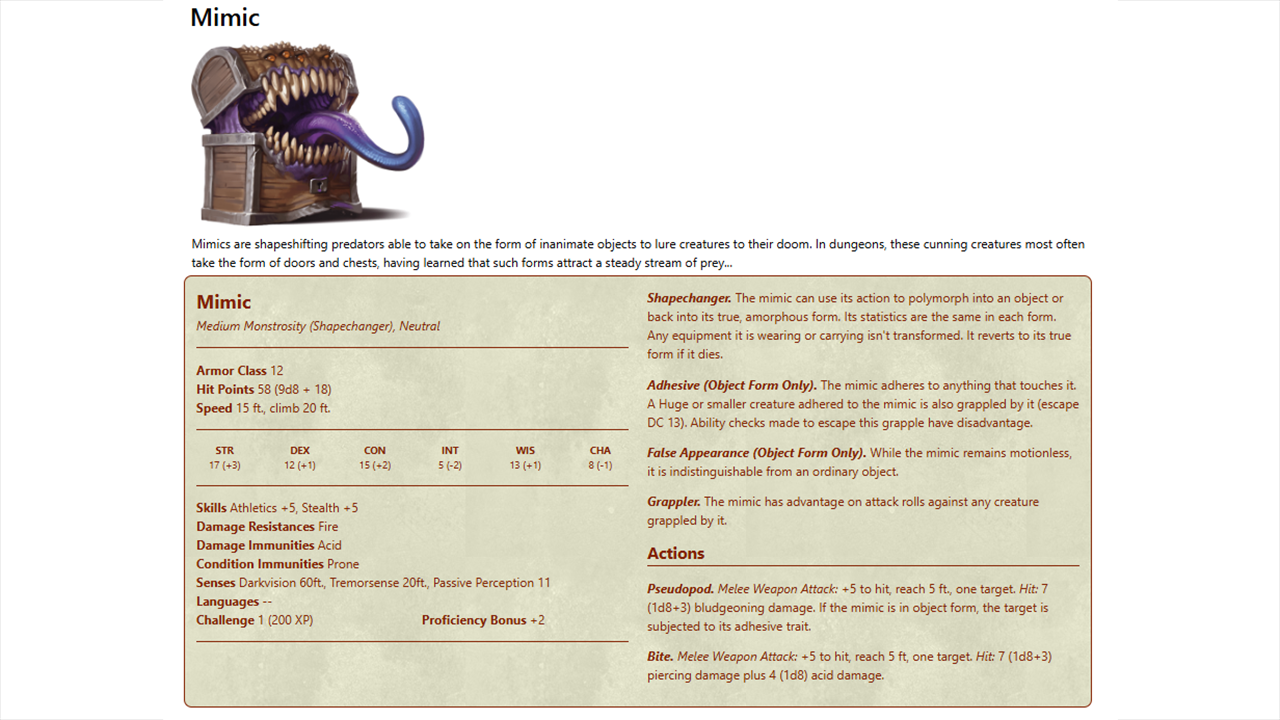
An interactive monster stat block builder for creating, editing, saving, loading, styling, and exporting 5E-compatible TTRPG monsters.

5E Monster Maker project screenshot

Overview

5E Monster Maker is a browser-based tool for building tabletop monster stat blocks. The user edits the stat block directly, opens modal controls for larger option groups, adjusts monster features, changes the visual theme, and exports the finished monster.

Editable Stat Block

Monster name, image, description, size, type, alignment, armor class, hit points, speed, abilities, skills, senses, languages, and features can be edited through the interface.

Rules-Oriented Controls

The tool includes controls for skills, damage types, conditions, senses, traits, actions, bonus actions, reactions, legendary actions, spellcasting, and movement speeds.

Exportable Output

Finished monsters can be saved, loaded, styled, and downloaded as an image.

Application Features

The project combines a live stat block preview with modular controls for editing monster rules and presentation.

Inline Editing

Clickable stat block fields open the relevant input or control set, allowing changes directly from the rendered monster sheet.

Monster Options Modal

Skills, damage resistances, damage immunities, condition immunities, senses, and languages are managed through tabbed modal controls.

Feature Builder

Traits, actions, bonus actions, reactions, legendary actions, and spellcasting options are managed through a dedicated feature interface.

Action Generation

Custom action forms support attacks, melee and ranged ranges, multiattack options, saving throws, areas of effect, damage dice, damage types, and description text.

Challenge Rating

Challenge rating and proficiency bonus update as monster statistics and combat-relevant values change.

Theme Controls

The stat block can be restyled with custom line, background, and text colors, plus texture options such as papyrus, sci-fi, brick, and water.

Technical Implementation

The application uses PHP partials for page sections and JavaScript modules for interaction logic. The main page loads the control panel, stat block, option modals, feature modals, speed controls, theme logic, save/load behavior, layout balancing, and screenshot export.

PHP Partials

The interface is split into reusable PHP sections for monster controls, the stat block, base stat inputs, monster options, monster features, speed controls, and small-screen handling.

JavaScript Modules

JavaScript modules initialize editable fields, modal interactions, feature builders, CR updates, save/load behavior, screenshot export, and layout rebalancing.

Scoped Styling

The tool uses a scoped Bootstrap build and custom Monster Maker CSS so the demo styling can coexist with the surrounding website.

Monster Creation Workflow

The tool is built around editing a visible stat block instead of filling out one long static form.

1. Edit Core Stats

The user starts from a default monster and edits identity, description, defensive stats, movement, ability scores, and basic rules text.

2. Configure Options

Skills, damage handling, condition immunities, senses, and languages are selected through modal controls.

3. Add Features

Traits, attacks, bonus actions, reactions, legendary actions, and spellcasting can be added or adjusted.

4. Style the Sheet

Theme controls allow the user to change colors and textures before saving or exporting the finished stat block.

5. Save or Load

The stat block can be saved to a text file and loaded back into the tool later.

6. Export Image

The printable area can be captured and downloaded as a PNG image.

Design Notes

The project is desktop-focused because the stat block, controls, modals, and export area need enough horizontal space to remain usable. Smaller screens receive a message instead of a compressed version of the full interface.

Live Preview

The stat block remains visible while the user changes monster values, making the tool feel closer to editing a finished sheet than filling out a disconnected form.

Modal Organization

Complex option groups are separated into modal panels so the main screen can stay focused on the monster sheet and primary controls.

Layout Rebalancing

Feature distribution and resize handling help keep the stat block layout balanced as content grows.